Ever wanted to make your computer do boring tasks for you, without having to learn all that complicated coding stuff? Well, you’re in luck! This article is all about n8n, a cool tool that lets you set up automated workflows without writing a single line of code. We’ll go from the very beginning, showing you how to get started, build your first automated process, and even use ready-made templates. So, if you’re ready to make your digital life a bit easier, stick around, because we’re about to explore what is n8n and how it can help you out.
Key Takeaways
- n8n is a free, open-source tool for automating tasks and connecting different apps, without needing to write code.
- You can run n8n on your computer or server, which gives you complete control over your information.
- Building workflows in n8n is like putting together digital Lego bricks; you link different actions to create a process.
- n8n has a big library of ready-to-use templates, which makes it simple to start automating things quickly.
- The n8n community is active and helpful, providing lots of resources and support for users.
Understanding What is n8n
N8N is a powerful tool for automating tasks between different applications and services. It lets you design workflows visually, connecting various nodes to achieve complex automation without needing extensive coding knowledge. Let’s explore what makes n8n stand out.
Table of Contents
Defining the Core Functionality
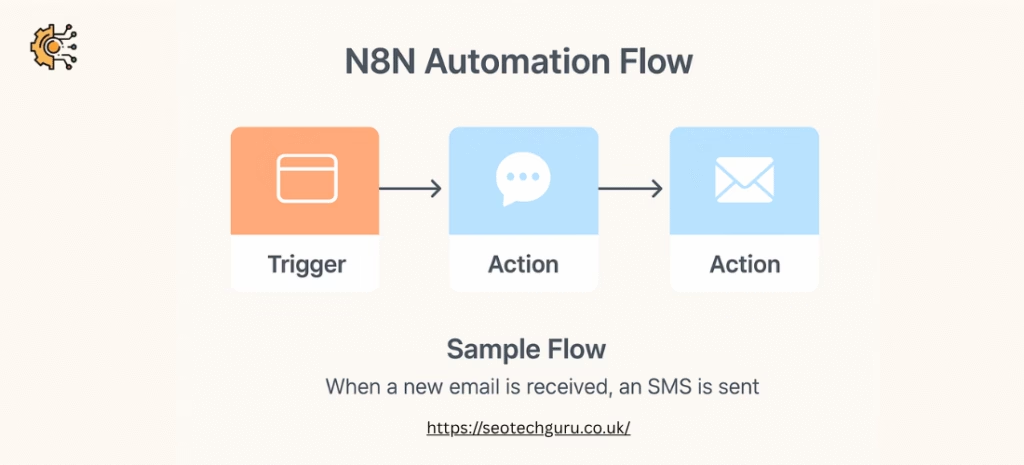
At its heart, n8n is a workflow automation platform. It allows you to link different apps and APIs together to automate repetitive tasks. Think of it as a digital bridge, connecting services like email, social media, databases, and more. You can design workflows using a drag-and-drop interface, making it accessible even if you’re not a seasoned coder. For example, you could set up a workflow that automatically saves email attachments to a cloud storage service or posts updates to social media whenever a new blog post is published. It’s all about streamlining processes and saving time.
Comparing n8n with Other Platforms
When it comes to automation platforms, there are many options available. However, n8n distinguishes itself in several key areas. Unlike some platforms that are purely cloud-based, n8n offers the flexibility of self-hosting. This gives you greater control over your data and infrastructure. Also, n8n is designed to be extensible, allowing you to integrate custom code and build your own integrations if needed. While other platforms might offer similar features, n8n’s open-source nature and focus on customisation set it apart. You can even find a real estate CRM on GitHub.
Exploring the Open-Source Advantage
One of the biggest advantages of n8n is that it’s open-source. This means the code is freely available, and you can inspect, modify, and distribute it. This brings several benefits:
- Community Support: A large and active community contributes to the platform, providing support, sharing workflows, and developing new integrations.
- Transparency: You have full visibility into how the platform works, which can be important for security and compliance.
- Customisation: You can tailor the platform to your specific needs, adding custom features and integrations.
The open-source nature of n8n fosters innovation and collaboration, ensuring the platform remains adaptable and responsive to the evolving needs of its users. It also means you’re not locked into a proprietary system, giving you greater freedom and control.
Here are some common questions people have about n8n:
- Is n8n free? Yes, n8n has a free, open-source version. There are also paid plans for cloud hosting and additional features.
- How much n8n cost? The cost varies depending on your needs. The open-source version is free, while cloud plans have different pricing tiers.
- What does n8n stand for? n8n doesn’t actually stand for anything. It’s just a name!
And here are some things you might want to know how to do:
- How to install n8n on ubuntu: There are detailed guides available in the n8n documentation for installing on Ubuntu servers.
- How to run n8n locally: You can run n8n locally using Docker or npm. The documentation provides instructions for both methods.
- Chatgpt extension for N8N: n8n has integrations with various AI services, including ChatGPT, allowing you to incorporate AI into your workflows.
Initiating Your n8n Journey
Navigating the Official Website
So, you’re ready to get started with n8n? Excellent! The first step is pretty straightforward: head over to the SEO Archives website. The landing page is your gateway to all things n8n. You’ll find a wealth of information there, from introductory material to detailed documentation. Take a few minutes to have a look around. You’ll see things like:
- Use cases for n8n.
- Customer testimonials.
- Links to the community forum.
- Pricing information (if you’re considering a paid plan).
It’s worth familiarising yourself with the layout, as you’ll likely be returning to the site often as you learn more about the platform.
Establishing Your Account
Once you’ve had a look at the website, it’s time to create your account. This is a simple process, but it’s important to choose the right option for your needs. n8n offers both a cloud-hosted version and a self-hosted option. For beginners, the cloud-hosted version is generally the easiest way to get started. Here’s how to do it:
- Click the ‘Get Started’ button on the n8n website.
- You’ll be directed to a registration page where you can create your account.
- Choose your plan. n8n offers a cloud-hosted version, n8n.cloud, which is a paid service with different subscription plans. However, for our tutorial, we’ll use the free trial, which is perfect for getting started and learning the ropes. It has some limitations, like the number of workflow executions per month, but it’s more than enough for testing.
- Log in. Once you’ve signed up, you can log into your dashboard at app.n8n.cloud. You’ll see an orange button that says “Open Instance.” Click that to enter your workflow canvas.
If you’re more technically inclined, you can also opt for the self-hosted version, which gives you more control over your data and infrastructure. However, this requires some technical knowledge and is beyond the scope of this initial guide.
Overview of the User Interface
Okay, you’ve got an account and you’re logged in. Now what? The n8n user interface (UI) might seem a little daunting at first, but don’t worry, it’s actually quite intuitive once you get the hang of it. The central part of the UI is the workflow canvas, where you’ll be building your automations. Here’s a quick rundown of the key elements:
- Nodes: These are the building blocks of your workflows. Each node represents an app or an action, such as sending an email or retrieving data from a database.
- Connections: These link the nodes together, defining the flow of data through your workflow.
- The sidebar: This provides access to various settings and options, such as credentials, executions, and templates.
- The header: This contains the main menu, where you can create new workflows, save your work, and access your account settings.
Take some time to explore the UI and familiarise yourself with the different elements. Experiment with dragging and dropping nodes onto the canvas and connecting them together. Don’t be afraid to make mistakes – that’s how you learn! You’ll be building your first workflow in no time.
Crafting Your Initial Workflow

Time to get your hands dirty and build something real! This is where the magic happens, where you transform ideas into automated processes. Don’t worry if it seems daunting at first; we’ll break it down into manageable steps.
Setting Up Your First Automation
The first step is always the hardest, but it’s also the most rewarding. Think of a simple task you want to automate. Maybe it’s sending a welcome email to new subscribers, or perhaps saving attachments from your email to a cloud drive. Whatever it is, keep it small and focused for your first attempt.
- Start with a clear goal. What do you want to achieve?
- Identify the trigger. What event starts the workflow?
- Map out the steps. What actions need to happen?
Once you have a plan, you can start building your workflow in n8n. Click the “Create new” button and select “Workflow”. You’ll be presented with a blank canvas, ready for your automation masterpiece. You can find step-by-step instructions in this guide.
Connecting Diverse Applications
n8n’s strength lies in its ability to connect different applications. This means you can create workflows that span multiple platforms, automating tasks that would otherwise require manual intervention. For example, you could connect your CRM to your email marketing platform, automatically adding new contacts to your mailing list.
To connect applications, you’ll need to use nodes. Each node represents a specific action, such as sending an email, creating a contact, or updating a spreadsheet. n8n offers a wide range of pre-built nodes for popular applications, and you can also create your own custom nodes if needed.
- Explore the available nodes.
- Authenticate with your applications.
- Configure the node settings.
Testing Your Workflow
Testing is crucial to ensure your workflow works as expected. Before you unleash your automation on the world, take the time to thoroughly test it. n8n provides tools for testing your workflow step-by-step, allowing you to identify and fix any issues.
- Use test data.
- Check the output of each node.
- Monitor for errors.
Don’t be afraid to experiment and iterate. Automation is an ongoing process, and you’ll likely need to tweak your workflows over time to optimise their performance. The key is to start small, test thoroughly, and learn as you go.
Leveraging Pre-Built Templates
n8n’s real strength lies in its adaptability, and a big part of that is the availability of pre-built templates. Instead of starting from a blank canvas every time, you can use these templates as a foundation, saving you a lot of time and effort. Think of them as blueprints for common automation tasks.
Accessing the Template Library
The template library is easily accessible within n8n. It’s essentially a marketplace of pre-configured workflows created by both the n8n team and the community. You can find it directly within the n8n interface, usually accessible via a ‘Templates’ or ‘Workflows’ section. The library is searchable, allowing you to philtre by category, application, or use case.
Importing Workflow Templates
Importing a template is usually a straightforward process. Here’s a general outline:
- Browse the template library and find a template that suits your needs.
- Click on the template to view its details and dependencies.
- Look for an ‘Import’ or ‘Use Template’ button. This will typically copy the template’s JSON code to your clipboard.
- In your n8n instance, create a new workflow and paste the JSON code. The workflow should then appear on your canvas.
Customising Imported Workflows
While templates provide a great starting point, they rarely fit your exact requirements perfectly. Customisation is key.
Remember to always review and adjust the imported workflow to match your specific needs. This includes updating credentials, modifying node configurations, and adding or removing steps as necessary.
Here are some common customisation tasks:
- Credentials: Update the credentials for any services used in the workflow (e.g., email, CRM, social media).
- Node Configuration: Adjust the settings of individual nodes to match your data and desired outcomes.
- Data Mapping: Ensure that data is being correctly mapped between different nodes.
- Error Handling: Implement error handling to gracefully manage unexpected issues.
With a bit of tweaking, you can transform a generic template into a powerful automation solution tailored to your specific needs.
Advanced n8n Capabilities
n8n really starts to shine when you push it beyond the basics. While setting up simple automations is straightforward, the platform offers a range of advanced features that allow you to tackle more complex and demanding workflows. These capabilities are what truly set n8n apart from simpler no-code tools.
Integrating Custom Code
Sometimes, the pre-built nodes just don’t cut it. That’s where n8n’s code nodes come in. You can inject JavaScript directly into your workflows, allowing you to perform custom data transformations, interact with APIs that don’t have dedicated nodes, or implement complex logic. This flexibility is a huge advantage, as it means you’re not limited by the platform’s existing functionality. It’s like having a secret weapon when you need to do something really specific.
Managing Complex Data Structures
Workflows often involve dealing with intricate data structures, such as nested JSON objects or arrays. n8n provides tools for manipulating and transforming this data, allowing you to extract specific values, philtre data based on certain criteria, or reshape the data to fit the requirements of another application. This is essential for building robust and reliable automations that can handle real-world data.
Implementing Error Handling
No automation is perfect, and errors are bound to occur. n8n provides mechanisms for handling these errors gracefully, preventing your workflows from crashing and ensuring that important tasks are not missed. You can use error handling nodes to catch exceptions, log errors, and even retry failed operations. This is crucial for building resilient automations that can withstand unexpected issues.
Proper error handling is not just about preventing crashes; it’s about ensuring the reliability and trustworthiness of your automations. By implementing robust error handling strategies, you can build workflows that are not only powerful but also dependable.
Here’s a simple example of how you might handle errors in n8n:
- Use a Try/Catch block to isolate potentially problematic nodes.
- In the Catch block, log the error details to a file or database.
- Send a notification to yourself or your team when an error occurs.
- Attempt to retry the failed operation after a delay.
Self-Hosting and Data Control
Benefits of Self-Hosting n8n
Self-hosting n8n gives you a huge amount of control over your data and workflows. You’re not reliant on a third-party provider, which can be a big deal for security and compliance. Think of it like having your own private workshop versus renting space in a shared facility. You get to decide the rules, the tools, and who has access. One of the main benefits is cost. While platforms like Zapier are great, the costs can quickly add up. With n8n, you’re mainly paying for your own infrastructure, which can be significantly cheaper in the long run. It’s also worth noting that the n8n fair code model makes the source code freely available, which is a big plus for transparency.
Here’s a quick rundown of the advantages:
- Complete data control.
- Reduced costs compared to SaaS solutions.
- Customisation options.
- Greater flexibility in integrations.
Ensuring Data Privacy and Security
When you self-host, data privacy becomes your responsibility. This means you need to think carefully about security measures. It’s not just about installing n8n; it’s about setting up firewalls, managing user access, and regularly backing up your data. You’ll also need to comply with relevant data protection regulations, such as GDPR or the Data Protection Act. This might sound daunting, but it’s a worthwhile investment if you’re dealing with sensitive information. Think about implementing encryption, both in transit and at rest, to protect your data from unauthorised access. Regular security audits are also a good idea to identify and address any vulnerabilities. You can even use n8n itself to automate some of these security tasks, such as monitoring logs and sending alerts.
Infrastructure Considerations
Self-hosting n8n means you need to think about the infrastructure it will run on. This includes servers, databases, and networking. You can choose to host it on-premises, in the cloud (using services like AWS, Azure, or Google Cloud), or even on a Raspberry Pi for smaller projects. The choice depends on your needs and technical expertise. Cloud hosting offers scalability and flexibility, while on-premises hosting gives you maximum control. Consider the following:
- Server specifications (CPU, RAM, storage).
- Database choice (PostgreSQL is recommended).
- Networking configuration (firewalls, load balancers).
- Backup and disaster recovery strategy.
Self-hosting n8n isn’t just about saving money; it’s about taking control of your data and workflows. It requires more technical expertise, but the benefits in terms of privacy, security, and customisation can be significant. It’s a great option for businesses that need to comply with strict data protection regulations or that want to build highly customised automation solutions. You can also check out Understanding Agents for better AI solutions.
Real-World n8n Applications
n8n isn’t just a theoretical tool; it’s being used in a variety of practical ways across different industries. Its flexibility allows businesses to automate tasks, integrate systems, and streamline processes without needing extensive coding knowledge. Let’s look at some real-world examples.
Automating Marketing Operations
Marketing teams often juggle multiple platforms and repetitive tasks. n8n can automate many of these, freeing up marketers to focus on strategy and creativity. For example:
- Automatically posting content to social media platforms at scheduled times.
- Collecting leads from various sources (like forms and landing pages) and adding them to a CRM.
- Sending personalised email sequences based on user behaviour.
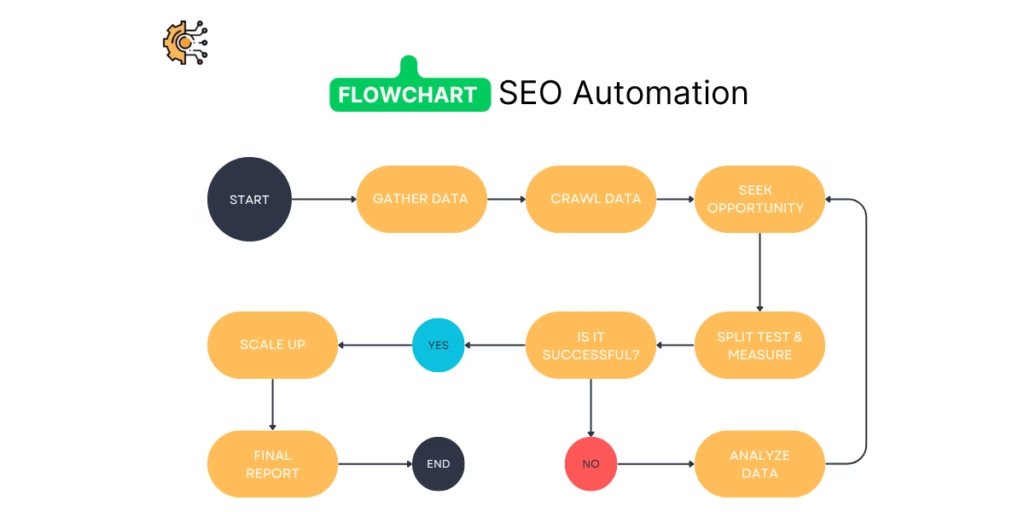
Imagine a scenario where a marketing team uses n8n for social media to automatically generate and post banners to different social media platforms using data from a Google Sheet. This saves time and ensures consistent branding across all channels.
Streamlining Business Processes
n8n can be used to automate internal business processes, improving efficiency and reducing errors. Consider these examples:
- Automatically creating invoices based on completed tasks or projects.
- Syncing data between different databases or applications.
- Managing inventory levels and triggering reorders when stock is low.
One company uses n8n to automate its entire order fulfilment process. When an order is placed on their website, n8n automatically creates a task in their project management system, updates the inventory levels, and sends a confirmation email to the customer. This has significantly reduced the time it takes to fulfil orders and has improved customer satisfaction.
Enhancing Customer Relationship Management
Effective CRM is vital for any business. n8n can help to improve CRM by automating tasks such as:
- Automatically updating customer records with new information from various sources.
- Sending automated follow-up emails after a customer interaction.
- Creating support tickets based on customer inquiries.
For instance, a business could use n8n to build a custom AI agent that automatically answers client questions, improving response times and freeing up support staff to handle more complex issues. This can lead to better customer satisfaction and increased loyalty.
The n8n Community and Support
n8n isn’t just a tool; it’s a community. And like any good community, there’s plenty of support to help you along the way. Whether you’re a complete beginner or a seasoned automation expert, there are resources available to assist you in your n8n journey. Let’s explore what’s on offer.
Engaging with the Open-Source Community
The n8n community is a vibrant and active group of users and developers. It’s a great place to ask questions, share your workflows, and get inspired by what others are building. You’ll find people of all skill levels, from those just starting out to experienced automation engineers. The community thrives on collaboration, so don’t be afraid to jump in and get involved. You can often find solutions to common problems or discover new ways to use n8n by browsing the forums and chat channels. It’s also a fantastic way to contribute back to the project and help others learn. For example, you might find help with workflow executions.
Accessing Documentation and Resources
n8n has pretty good documentation, which is always a bonus. It covers everything from the basics of setting up your first workflow to more advanced topics like integrating custom code. The documentation is constantly updated, so you can be sure you’re getting the latest information. Besides the official docs, there are also plenty of tutorials, blog posts, and videos created by the community. These resources can be really helpful for learning specific skills or getting inspiration for your own projects. Here’s a few things you can expect to find:
- Detailed explanations of each node and its options.
- Step-by-step guides for common automation tasks.
- Examples of real-world workflows.
- Troubleshooting tips and tricks.
Troubleshooting Common Issues
Even with the best documentation and a supportive community, you’re bound to run into problems from time to time. When things go wrong, don’t panic! There are several things you can do to troubleshoot the issue. First, check the n8n logs for any error messages. These can often provide clues about what’s going wrong. Next, try searching the community forums or documentation for similar issues. Chances are, someone else has already encountered the same problem and found a solution. If you’re still stuck, don’t hesitate to ask for help from the community. Be sure to provide as much detail as possible about the issue, including the steps you’ve already taken to try and resolve it. Here’s a few common issues and how to solve them:
- Authentication errors: Double-check your API keys and credentials.
- Node errors: Review the node’s configuration and input data.
- Workflow errors: Test your workflow step-by-step to identify the problem area.
Remember, the n8n community is there to support you. Don’t be afraid to ask for help, share your knowledge, and contribute back to the project. Together, we can build amazing automations and make n8n even better.
Optimising Workflow Performance

So, you’ve built some n8n workflows – fantastic! But are they running as efficiently as they could be? Just like tuning a car engine, optimising your workflows can make a huge difference to speed, reliability, and resource usage. Let’s look at how to get the most out of your automations.
Monitoring Workflow Executions
First things first, you need to know how your workflows are performing. n8n provides execution logs that are your best friend here. Keep an eye on execution times – are some nodes taking longer than expected? Are there any errors popping up regularly? This data is invaluable for pinpointing bottlenecks. Consider setting up alerts for failed executions so you can jump on problems quickly. It’s also worth checking the resource usage of your n8n instance itself. Is it maxing out the CPU or memory? If so, it might be time to scale up your infrastructure or optimise your workflows to be less demanding. You can also use AI workflows to monitor and analyse these logs automatically.
Refining Node Configurations
Once you’ve identified potential problem areas, it’s time to get your hands dirty with node configurations. Are you fetching more data than you need? Could you philtre data earlier in the workflow to reduce the amount processed by later nodes? Are you using the most efficient node for the job? Sometimes, a little tweaking can make a big difference. For example, using the ‘Merge’ node efficiently can prevent unnecessary loops. Also, make sure you’re using the correct data types – converting data unnecessarily can add overhead. Here’s a few things to consider:
- Data Filtering: Philtre data as early as possible to reduce the amount of data processed in subsequent nodes.
- Batch Processing: Process data in batches where appropriate to reduce the number of individual API calls.
- Efficient Node Selection: Choose the most efficient node for the task. Sometimes a ‘Function’ node with custom JavaScript can be faster than a more complex pre-built node.
Scaling Your Automations
As your automation needs grow, you might find that your initial setup struggles to keep up. This is where scaling comes in. There are a few different approaches you can take. One option is to increase the resources available to your n8n instance – more CPU, more memory, more storage. Another is to distribute the workload across multiple n8n instances. This can be achieved using a message queue like RabbitMQ or Redis. This allows you to run workflows in parallel, significantly increasing throughput. Don’t forget to monitor your system closely as you scale to ensure that everything is running smoothly. Consider using a workflow automation tool to manage and monitor your scaled n8n instances.
Optimising your n8n workflows is an ongoing process. Regularly review your workflows, monitor their performance, and make adjustments as needed. By doing so, you can ensure that your automations are running efficiently and reliably, freeing up your time to focus on more important tasks.
Future-Proofing Your Automations
It’s easy to get your automations up and running, but what about keeping them running smoothly in the long term? Future-proofing your n8n workflows is all about planning for change and ensuring your automations remain robust and effective as your needs evolve and n8n itself gets updated.
Staying Updated with n8n Releases
n8n is constantly evolving, with new features, bug fixes, and security patches released regularly. Keeping your n8n instance up to date is crucial for maintaining optimal performance and security. Here’s what to keep in mind:
- Subscribe to the n8n newsletter or follow their blog to stay informed about new releases.
- Review the release notes carefully to understand the changes and any potential impact on your existing workflows.
- Schedule regular update windows to apply the latest updates. Consider using a staging environment to test updates before deploying them to production.
Adopting Best Practises for Workflow Design
Well-designed workflows are easier to maintain and adapt over time. Here are some best practises to follow:
- Use clear and descriptive names for your workflows and nodes. This makes it easier to understand the purpose of each component.
- Document your workflows thoroughly, explaining the logic and purpose of each step. This is especially important for complex automations.
- Break down complex workflows into smaller, more manageable modules. This makes it easier to debug and modify individual components.
- Implement proper error handling to gracefully handle unexpected issues. This prevents your workflows from crashing and ensures data integrity. Consider using the AI for businesses to help you with this.
Exploring New Integration Possibilities
The world of integrations is constantly expanding, with new services and APIs emerging all the time. Staying open to new integration possibilities can help you unlock even greater automation potential. Consider these points:
- Regularly review the n8n integrations directory to discover new services and APIs that you can connect to.
- Experiment with custom integrations using the HTTP Request node to connect to services that don’t have a dedicated n8n node.
- Engage with the n8n community to learn about new and innovative ways to use the platform. I remember when I was building my first automation, I spent hours watching videos and reading documentation. It was frustrating at first, but eventually, something clicked, and I was able to get it working.
By proactively staying updated, adopting best practises, and exploring new integration possibilities, you can ensure that your n8n automations remain valuable assets for years to come.
Want to make sure your automated systems keep working well, no matter what changes come along? It’s like building a strong house that can stand up to any storm. Learn how to make your automations last by visiting our website. We’ve got simple tips to help you out.
Conclusion
So, there you have it. We’ve gone through setting up n8n and even built a simple automation from scratch. It’s pretty clear that n8n is a solid choice for anyone wanting to automate tasks without getting bogged down in code. You can connect all sorts of apps and services, which is really handy. Plus, the fact that it’s open-source and you can host it yourself means you’ve got a lot of control over your data and how things run. Whether you’re just starting out or you’ve got more complex ideas, n8n gives you the tools to make it happen. It’s definitely worth checking out if you’re looking to make your digital life a bit easier.
Frequently Asked Questions
What exactly is n8n?
n8n is a clever tool that lets you link up different apps and services to make your computer tasks happen on their own. You don’t need to write complicated computer code. Think of it like building with digital Lego bricks – you connect them up to create a flow of actions.
What sorts of things can I do with n8n?
You can do loads with n8n! It’s great for things like sending automatic emails, posting on social media, moving information between spreadsheets, or even making smart AI tools work together. It’s all done visually, so it’s quite easy to get the hang of.
Is n8n a good thing to learn?
Yes, it’s definitely worth learning n8n, especially if you want to make things happen automatically without becoming a computer programmer. It’s free to use in many ways, very flexible, and lots of people are starting to use it, both in big companies and small teams.
How do I get started with n8n?
Setting up n8n is pretty straightforward. You just go to their website, make an account, and then you’ll see a clear screen where you can start dragging and dropping bits to build your first automated task. They also have lots of ready-made examples to help you get started.
What makes n8n different from other tools?
n8n is special because it’s ‘open-source’. This means the main computer code is available for anyone to see and change. It also means you can run it on your own computer or server, which gives you more control over your information and can save you money compared to other similar tools.
Can I use pre-made templates in n8n?
Yes, n8n has a huge collection of ready-made examples called ‘templates’. You can find them on their website. Just pick one, copy it, and paste it into your n8n workspace. Then you can tweak it to fit exactly what you need.
Do I need to be a programmer to use n8n?
Absolutely! Even if you’re not a computer expert, you can use n8n. It’s designed to be visual and easy to understand. You don’t need to write any code to get many useful automated tasks up and running.
Where can I get help if I have problems with n8n?
n8n has a big online community where people help each other out. There are also lots of guides and how-to videos available. If you get stuck, you can usually find an answer or ask for help from other users.