So, we’re talking about how websites tell search engines what to do, right? You’ve probably heard of robots.txt and sitemap.xml. They’ve been around for ages and help Google and others find and index your stuff. But now, with AI getting smarter and people asking it questions instead of typing into a search bar, there’s a new file on the block: llms.txt. It’s supposed to help AI models understand your website better. Let’s figure out what this llms.txt thing is all about and how it stacks up against the old guard.
Key Takeaways
- What is llms.txt? It’s a simple text file, often in markdown, placed at your site’s root. Its main job is to guide AI models, like ChatGPT or Gemini, to your most important content, giving them context and structure.
- Robots.txt controls what search engine bots can crawl, acting like a gatekeeper to block access. Sitemap.xml lists every page, acting like a map for discoverability.
- Unlike robots.txt and sitemap.xml, which are for traditional search engines, llms.txt is specifically designed to help AI understand and prioritize your content for AI-driven answers.
- Using llms.txt can help improve the accuracy of AI-generated answers about your brand, build customer trust, and give you an edge as AI search becomes more common.
- Best practices for llms.txt include keeping it focused on high-value content, using markdown formatting, and updating it regularly to ensure AI has the latest information.
Table of Contents
Understanding the Role of llms.txt
So, you’ve probably heard about robots.txt and sitemap.xml, right? They’ve been around for ages, helping search engines like Google figure out what to crawl and how to index your site. But now, with AI chatbots and generative search becoming a thing, there’s a new player in town: llms.txt. Think of it as a special instruction manual, but instead of telling human-readable bots where to go, it’s for the AI models themselves. It’s all about making sure these AI systems understand your content the way you want them to.
What is llms.txt: A Curated Guide for AI
Basically, llms.txt is a simple text file that you put in the main folder of your website. Its job is to give AI models, like the ones powering ChatGPT or Google’s AI Overviews, a clear signal about what content on your site is most important. It’s like saying, “Hey AI, if you’re going to use my stuff, pay attention to these pages first, and here’s why they matter.” It helps AI avoid getting bogged down in all the extra bits of a webpage that aren’t really the core message, like ads or complicated navigation. This file is designed to be easy for both humans to write and for AI to read, making your content more accessible to these new search tools. It’s a way to proactively guide AI, rather than just hoping it figures things out on its own. Many companies are already using it to make sure their documentation and product info are represented accurately by AI.
The Core Function of llms.txt
The main goal here is to improve how AI models interact with your website’s content. Instead of AI just guessing what’s important, llms.txt provides a direct pathway to your key information. It helps AI models understand the context and priority of your content, which can lead to more accurate summaries and answers when people ask questions. This is super important because AI isn’t just indexing like old-school search engines; it’s generating answers. If the AI misunderstands your content or misses the most relevant parts, it can lead to misrepresentation or just plain wrong information being presented to users. So, llms.txt acts as a curator, pointing AI towards the good stuff.
llms.txt: Beyond Simple Text Files
While it’s called a text file, llms.txt is more than just a basic list. It’s structured, often using markdown, to provide clear instructions and context. You can include summaries of your most important pages, links to those pages, and even brief descriptions. Some people are even adding metadata like update times or token counts to help AI frameworks decide what information is most relevant for a given query. It’s a flexible tool that lets you communicate directly with AI systems about your content strategy. It’s not about blocking AI, like robots.txt does for crawlers, but about actively helping AI understand and use your content effectively. This proactive approach is becoming increasingly important as AI search continues to evolve, and it’s a smart move for anyone who wants their website to be found and understood in this new landscape. It’s a way to make your site AI-ready, which is becoming just as important as making it SEO-ready. You can find more details on how to implement this on Zapier’s website.
Distinguishing llms.txt from Robots.txt and Sitemap.xml
You’ve probably heard of robots.txt and sitemap.xml. They’ve been around for ages, helping search engines figure out your website. But now, with AI getting smarter and becoming a primary way people find info, we’ve got a new player: llms.txt. It’s not really a replacement for the old guard, but more like a specialized assistant.
Robots.txt: The Gatekeeper of Crawling Access
Think of robots.txt as the bouncer at a club. Its main job is to tell search engine crawlers, like Googlebot or Bingbot, which doors they’re allowed to go through and which ones are off-limits. You use it to block bots from accessing sensitive areas, like your admin login page or duplicate content that you don’t want indexed. It’s all about controlling access and managing your crawl budget. It doesn’t really care about the quality of your content, just whether bots can see it.
Sitemap.xml: The Comprehensive Site Directory
Now, sitemap.xml is like a detailed map of your entire city. It lists every single street (URL) in your website, making sure search engines don’t miss anything. It helps them discover all your pages, especially those buried deep within your site structure. While it lists everything, it doesn’t tell the AI which pages are the most important or what your brand is really about. It’s a directory, not a curated guide.
llms.txt: The AI Content Curator
This is where llms.txt steps in. It’s designed specifically for AI models, like ChatGPT or Gemini. Instead of just listing pages or blocking access, llms.txt acts as a friendly tour guide for AI. It highlights your most important content, provides summaries, and gives context about your brand. The goal is to help AI understand what’s truly valuable on your site so it can provide accurate and relevant answers to users. It’s about curation and clarity for AI, making sure your key information gets the spotlight it deserves. This file helps AI models identify and prioritize high-value content on your website.
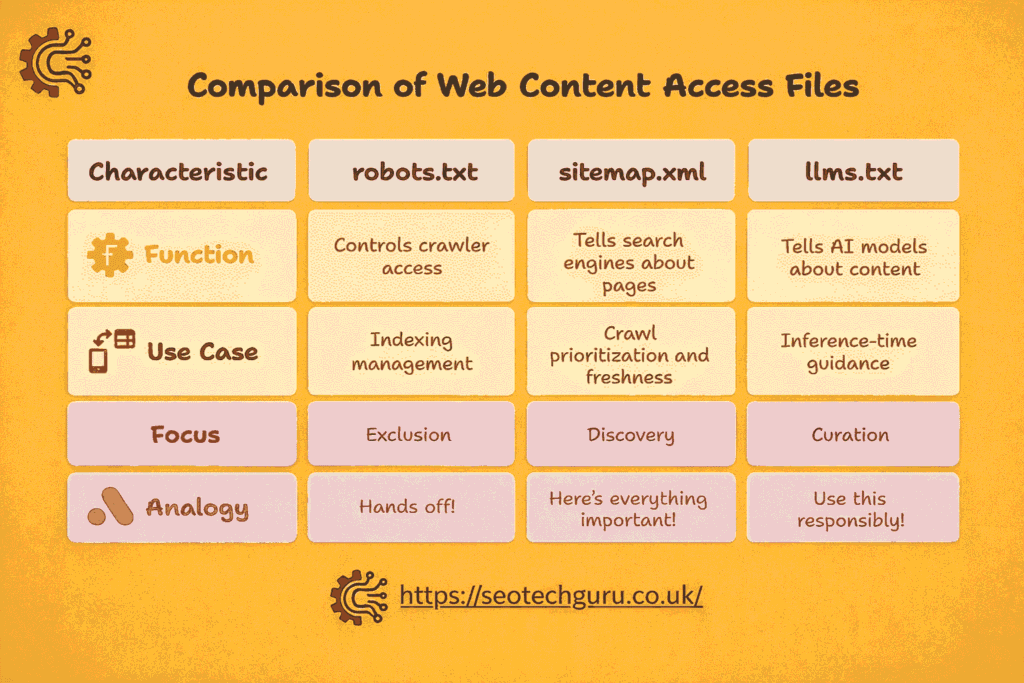
Here’s a quick breakdown:
- Robots.txt: Controls access (what bots can see).
- Sitemap.xml: Lists all pages (a complete directory).
- LLMs.txt: Curates key content (a guide for AI).
While robots.txt is about exclusion and sitemap.xml is about discovery, llms.txt is fundamentally about curation for AI.
The Technical Foundation of llms.txt
So, what’s actually inside this llms.txt file, and how do you put it together? It’s not rocket science, but there’s a bit of a method to the madness if you want AI to actually pay attention. Think of it as creating a cheat sheet for bots.
Anatomy of an llms.txt File
At its heart, llms.txt is a plain text file, usually written in Markdown. It lives in the root directory of your website, so it’s accessible at yourdomain.com/llms.txt. The basic structure is pretty straightforward. You start with a main heading, usually your company or project name, followed by a brief description. Then, you break down your content into logical sections using subheadings. Each item within a section is a link to a specific page, accompanied by a short description of what that page contains. It’s all about making it easy for AI to understand what’s important on your site.
Here’s a peek at the typical layout:
# Your Website Name
> A brief, clear summary of what your website is about.
Some extra notes or context that might be helpful for AI.
– [Getting Started Guide](https://yourdomain.com/docs/getting-started): How to set up and begin using our product.
– [API Reference](https://yourdomain.com/api/reference): Detailed information on all available API endpoints.
– [Feature A Explained](https://yourdomain.com/features/feature-a): Learn about the benefits and usage of Feature A.
– [Feature B Details](https://yourdomain.com/features/feature-b): In-depth look at Feature B and its capabilities.
Markdown Structure for AI Clarity
Why Markdown? Because it’s simple, human-readable, and AI models are trained to process it efficiently. Using Markdown headings (#, ##, ###) helps create a clear hierarchy. Bullet points (- or *) are perfect for listing out your pages and their descriptions. This structured approach helps AI models quickly grasp the organization and relevance of your content. It’s like giving the AI a map instead of just a pile of papers. You can even add optional metadata, like timestamps or token counts, if you’re feeling technical, which can help AI systems prioritize information. For instance, you might see entries like [API Reference](url): API documentation details (Updated: 2024-12-10, ~3,400 tokens). This kind of detail helps AI frameworks decide what to load or skip based on the query. You can find more details on how to structure these files on sites discussing AI content curation.
Key Content Prioritization in llms.txt
The real power of llms.txt comes from how you prioritize what goes in. It’s not just about listing every single page. You want to highlight the content that truly defines your product, service, or brand. Think about:
- Core Documentation: Your main guides, setup instructions, and foundational information.
- High-Performing Pages: Content that consistently drives conversions or engagement.
- Frequently Referenced Resources: Pages that users or customers often look for.
- Technical Details: API references, developer guides, or anything crucial for technical users.
By carefully selecting and describing these key pieces of information, you guide AI models toward the most valuable parts of your website. This means when an AI is asked a question related to your offerings, it’s more likely to pull accurate information directly from your prioritized content, improving the chances of your site appearing in AI-generated answers.
Enhancing AI Interactions with llms.txt
Improving Accuracy and Trust with llms.txt
Think about it: AI models are trying to make sense of the vast internet, and sometimes they get it wrong. They might pull outdated info, misunderstand a product feature, or even mix up your brand with a competitor’s. It’s a real problem when your business information isn’t represented correctly. llms.txt acts like a clear, concise cheat sheet for these AI systems. By providing a structured markdown file with your most important content, you’re essentially telling the AI, “Here’s the good stuff, here’s what you should focus on.” This direct guidance helps prevent misinterpretations and builds trust because the AI is more likely to pull accurate, up-to-date details directly from your curated file. It’s a way to proactively manage your brand’s digital footprint in the AI space, making sure what gets presented is what you actually want to communicate. It’s about getting your core message across without the AI having to guess.
Streamlining the Customer Journey via AI
When AI can quickly and accurately understand what your business offers, it makes the whole experience smoother for potential customers. Imagine someone asking an AI about a specific service, and the AI, thanks to your llms.txt file, can immediately point them to the right page with a clear summary. This cuts down on confusion and frustration. Instead of a customer sifting through pages of search results or getting a vague AI answer, they get a direct, helpful response that leads them exactly where they need to go on your site. This improved interaction can significantly impact conversion rates because you’re guiding users more effectively from their initial AI query right to your product or service. It’s about making your business easily discoverable and understandable through AI.
Gaining a Competitive Edge with AI Readiness
Let’s face it, AI is becoming a primary way people find information, and if your site isn’t optimized for it, you’re falling behind. Companies that are already implementing llms.txt are essentially future-proofing their online presence. They’re making sure that as AI search and content generation evolve, their information is accessible and correctly interpreted. This gives them a significant advantage. When AI models are trained or queried, they’ll have a clearer, more accurate picture of your business compared to competitors who haven’t taken these steps. It means your brand is more likely to be featured in AI-generated answers, summaries, and even new forms of search that haven’t fully emerged yet. Being AI-ready isn’t just about staying current; it’s about positioning your business for future growth and visibility in a rapidly changing digital landscape. You can start by looking at how other companies are using this guide to get their content recognized by AI systems.
The Impact of llms.txt on Answer Engine Optimization
AI search tools like ChatGPT, Claude, and Google’s AI Overviews are changing how people find information. Your audience isn’t just searching on Google anymore; they’re relying on quick, summarized results from AI. If you want your brand to be part of the answers AI provides, your content needs to be optimized for how large language models work. That’s where llms.txt comes in.
Guiding AI Models to High-Value Content
LLMs don’t crawl and rank like search engines. They interpret, synthesize, and generate. If they can’t find structured, clean, and relevant context about your brand, they’ll pull from whatever scraps they can find. This can lead to your pricing, product info, or positioning being misrepresented or left out entirely. With llms.txt, you give AI models direct access to clean markdown summaries of your key content, links to important pages, and descriptions that explain your products or services. This helps LLMs pull accurate info and improves your chances of showing up in answers, especially in zero-click AI results. It acts as a curated roadmap that guides AI models directly to your high-value content, telling them exactly where to find it in a format they can use immediately. This improves your site’s visibility in the evolving AI search landscape.
Ensuring Accurate Representation in AI Answers
Your website structure, built for human users with interactive tabs and dynamic content, can confuse or overwhelm an AI. Things like navigation menus, cookie popups, and JavaScript-heavy content can waste tokens and obscure meaning. LLMs operate with limited context windows, and if important information is buried, it gets ignored. llms.txt removes this friction by providing a flattened, structured view of your best content, tailored for AI. By providing a clean, structured list of high-value content, llms.txt gives large language models better content discovery and response accuracy. AI can cite your content more precisely when generating answers, and your technical guides and API references get better representation in AI-powered searches. It helps AI avoid noisy, ad-heavy, or hard-to-parse HTML, guiding LLMs toward fresh, accurate, branded content instead of old scraped copies.
Visibility in the Evolving AI Search Landscape
AI optimization, sometimes called GEO (Generative Engine Optimization), isn’t a future trend; major AI platforms are already parsing llms.txt files. Anthropic (Claude) actively consumes llms.txt and llms-full.txt for documentation ingestion. If you’re already optimizing for AEO with structured headers, FAQs, and schema, llms.txt builds on that, giving you a better shot at showing up in both search results and AI answers. It doesn’t stop AI models from training on your content (that’s managed via robots.txt or other methods), but it helps them find and use the right content, the right way. In short, robots.txt is about access control, while llms.txt is about content clarity. They aren’t competitors; they’re teammates. Use both to build a smarter, AI-ready site. You should update your llms.txt file whenever you add new products, blog posts, FAQs, or documentation, or when you notice AI systems providing outdated information about your site. Regular updates ensure that AI tools access the most current and relevant information about your website.
Best Practices for Implementing llms.txt
So, you’ve put together your llms.txt file, and now you’re wondering what’s next. It’s not just about creating it and forgetting it, you know? Think of it like tending a garden; you gotta keep it watered and weeded. Getting this right means AI models actually use your good stuff and don’t get confused by outdated info.
Avoiding Common Pitfalls in llms.txt Creation
Lots of people mess this up. The biggest mistake is probably making it too complicated. You want clear instructions, not a novel. Another common issue is not putting it in the right place – it needs to be at the root of your website, like yourdomain.com/llms.txt. If it’s buried somewhere else, AI crawlers won’t find it. Also, don’t forget to check for typos; a single misplaced character can break the whole thing. It’s like trying to read a book with half the letters missing – just doesn’t work.
- Keep it simple: Use straightforward language and clear paths.
- Check the location: Ensure it’s in your site’s root directory.
- Proofread: Typos are the enemy of clear instructions.
Making sure your llms.txt file is accessible and correctly formatted is key. If a browser can’t pull it up, an AI won’t either. Always test the public URL.
Maintaining Accuracy with Regular Updates
Your website changes, right? New blog posts, updated product info, maybe a whole new section. Your llms.txt needs to keep up. If you’ve got a process for updating your sitemap, try to loop llms.txt into that. It doesn’t need daily updates, but a monthly check-in or a quarterly review makes sense, especially if you’re actively publishing new content. Think about what information is most important now. This helps AI models point users to the most relevant, current details, which is good for everyone.
- Schedule reviews: Set a recurring calendar reminder.
- Integrate with content workflow: Make it part of your regular site maintenance.
- Prioritize fresh content: Highlight what’s new and important.
The Synergy of llms.txt with Other SEO Files
Don’t think of llms.txt as a standalone thing. It works best when it plays nice with your other important files, like robots.txt and sitemap.xml. While robots.txt tells search engines what not to crawl, and sitemap.xml lists everything that can be crawled, llms.txt guides AI on how to interpret and prioritize that content. They’re like a team. If you disallow a page in robots.txt, it probably doesn’t need to be in llms.txt unless you have a very specific reason. Making sure these files align helps create a consistent message for all bots, whether they’re for traditional search or for AI. You can find some great tips on implementing LLMS.txt files to get started.
Certainly! Here’s a clear comparison table with a heading for llms.txt vs llms-full.txt:
Difference Between llms.txt and llms-full.txt
| Feature | llms.txt | llms-full.txt |
| Purpose | Acts as an index of content | Contains the full content directly |
| Structure | List of links with brief descriptions | Full detailed information in one file |
| Navigation Required | Yes – LLMs must follow links to access full content | No – All content is available in one place |
| File Size | Smaller and lightweight | Can be large, depending on content |
| Context Window Usage | Minimal – content accessed separately | High – may exceed LLM context limits |
| Use Case | Best for large sites or structured documentation | Suitable for smaller content sets or direct access needs |
Wrapping It Up: Your AI-Ready Toolkit
So, we’ve looked at robots.txt, sitemap.xml, and the new kid on the block, llms.txt. Think of robots.txt as the bouncer at the club, deciding who gets in and who doesn’t. Sitemap.xml is like the venue’s floor plan, showing every room. But llms.txt? That’s the curated VIP list and a personal tour guide, specifically for AI. It tells AI models exactly where the good stuff is, making sure your most important content gets seen and understood correctly. While robots.txt and sitemaps are still important for traditional search, llms.txt is becoming key for how AI finds and uses your information. Getting this right means your brand can actually show up accurately in AI answers, not just get lost in the noise. It’s a simple file, but it could make a big difference in how your website performs in the AI-driven future.
Frequently Asked Questions
What exactly is an llms.txt file?
Think of llms.txt as a special map for AI. It tells AI programs, like ChatGPT, exactly which parts of your website are most important and what they mean. This helps the AI give you better, more accurate answers. It’s like a friendly guide for AI.
How is llms.txt different from robots.txt and sitemap.xml?
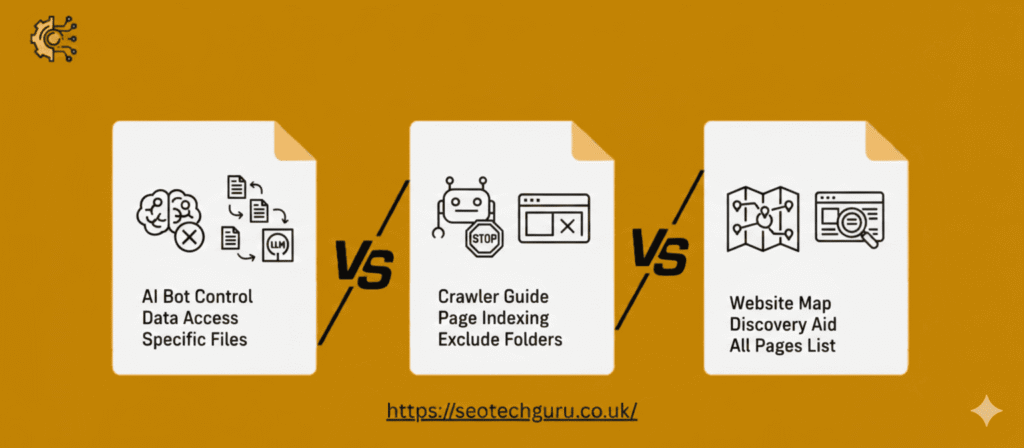
Robots.txt is like a security guard for your website. It tells search engine bots which areas they are allowed to visit and which areas they should stay away from. Sitemap.xml is like a full list of all the rooms in your house, telling search engines about every page. Llms.txt is different because it’s a guide specifically for AI, showing it the most important information and how to understand it.
What kind of information should I put in my llms.txt file?
An llms.txt file should have your website’s name at the top, a short description of your site, and then a list of your most important pages with brief explanations. It’s best to use a simple writing style called Markdown, which uses headings and links to make it easy for AI to read.
Why is llms.txt important for AI and my website?
Having an llms.txt file helps AI give more accurate answers about your website. When AI understands your content better, customers get the right information about products or services, which builds trust. It also helps your website stand out when people use AI to search for things.
How often do I need to update my llms.txt file?
You should update your llms.txt file whenever you add new important content, change your website’s structure, or notice that AI is giving out-of-date information. Keeping it fresh ensures AI always has the most current details about your site.
What’s the main benefit of using llms.txt for my website’s content?
The main goal is to make sure AI tools understand your website’s most valuable content correctly. This helps AI give better answers to people asking questions. It’s about making your content clear and easy for AI to use, so your brand is represented accurately.